
Integrations / Accounting software / Fakturatik

E-invoices from the Fakturatik program
XML exportFakturatik by Rastislav Korytár is an invoicing program for sole traders and small companies that issues e-invoices in the Peppol BIS Billing 3.0 format (UBL 2.1) since version 3 and stores them as XML files. The program neither sends nor receives them itself: sending to the customer, the delivery receipt and the report to the Financial Administration are handled by the Verteco portal, to which you upload the exported files. Receiving e-invoices works as soon as you select the provider on the Financial Administration portal, without changing the program.
Vendor website: www.fakturatik.sk ↗Vendor guide: Fakturatik and XML e-invoices ↗
Direct integration guaranteed by the software vendor · 5 October 2026
Rastislav Korytár, author of the Fakturatik program: Fakturatik exports invoices to XML according to Peppol BIS Billing 3.0 (UBL 2.1), by double-clicking the XML icon next to an invoice or with the Export XML button for a whole day. The author of the program gave us the procedure and the screenshots and links to our page from his website. You upload the files in the portal under Send by file and they leave through the Peppol network; the program itself neither sends nor receives e-invoices.
How it works
- 1In Fakturatik, under Program settings (Documents tab), choose the folder for the XML export, check the company ID (IČO), VAT ID and country codes of your partners and set the e-invoice type on the invoice. The procedure is in the vendor guide on fakturatik.sk and in the program manual (PDF).
- 2Export: a double-click on the XML icon at the far right of an invoice line saves that one invoice, the Export XML button on the top bar saves all invoices issued on the same day as the selected one at once. The files are named "Document number - Customer name.xml".
- 3In the portal open Send e-invoice → Send by file, choose the format UBL XML (Peppol BIS 3.0) and the company and upload the files from the export folder, several at once or a whole ZIP. The portal checks them, shows the amounts and sends them after your confirmation; the XML is not changed.
- 4Under Sent invoices you follow the status in the network (MLS delivery receipt) and the report to the Financial Administration. Received e-invoices arrive by e-mail with the PDF and the original XML and are in the portal; Fakturatik does not load them, you record them as before.
What the integration solves
- ✓The Fakturatik export is standard Peppol BIS Billing 3.0 (UBL 2.1); the portal sends it unchanged, exactly as the program created it
- ✓One invoice by double-click or a whole day with one button; in the portal you upload several files at once or a ZIP
- ✓Checked against EN 16931 and Peppol BIS before sending, errors in plain language; you fix the invoice in Fakturatik and upload the file again
- ✓Delivery receipts (MLS) and the status of every invoice in the Verteco portal
- ✓The tax report to the Financial Administration (TDD) is handled by our Access Point automatically
- ✓Receiving e-invoices works right away and independently of the program, PDF and original XML of every received invoice by e-mail
From Fakturatik into the Peppol network: an illustrated guide
Fakturatik issues the invoice and stores it as XML according to Peppol BIS Billing 3.0. Sending to the customer, the delivery receipt and the report to the Financial Administration are then handled by the Verteco portal. The whole procedure has four steps.
Prepare Fakturatik for XML e-invoices
Under Program settings, on the Documents tab, choose the folder the XML files will be exported to. Check the company ID (IČO), VAT ID and country code of your company and of your customers, the exemption type on lines with 0 % VAT and the ISO 4217 currency code for foreign currencies. Set the e-invoice type on the invoice. The exact step-by-step procedure is in the vendor guide and in the program manual.
Vendor guide: Fakturatik and XML e-invoices ↗Export one invoice or a whole day at once
You export one invoice by double-clicking the XML icon at the far right of its line. The Export XML button on the top bar exports all invoices issued on the same day as the selected invoice at once. The files are saved in the chosen folder as "Document number - Customer name.xml".
Program manual (PDF) ↗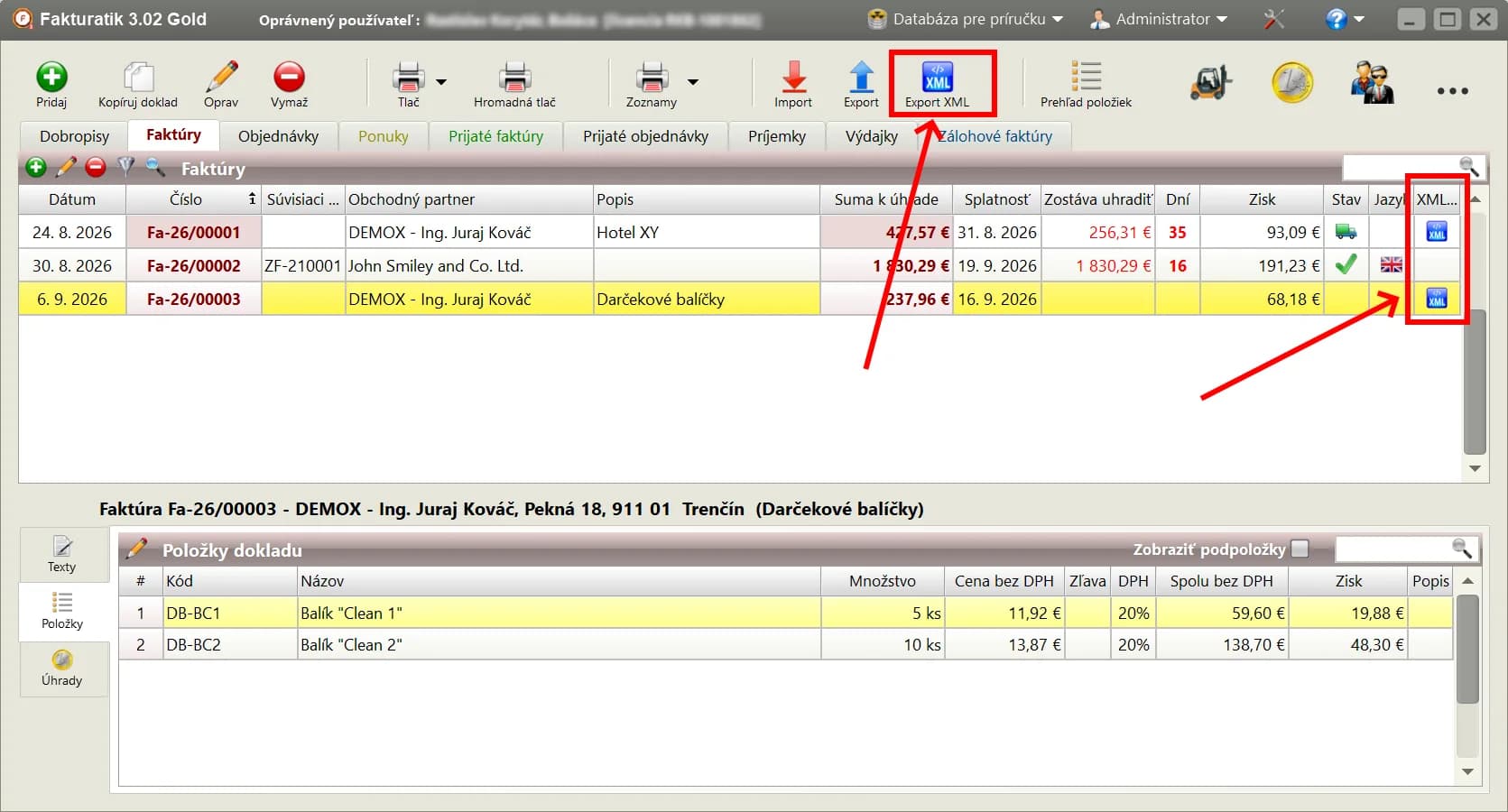
The main Fakturatik window: the Export XML button (top) and the XML icon next to an invoice (right). Picture provided by the author of the program. Upload the XML files in the portal
In the portal open Send e-invoice and the Send by file tab, choose the format UBL XML (Peppol BIS 3.0) and the company you are sending for. Then select one or more .xml files from the export folder; the portal also accepts a whole ZIP.
Open Send by file (after signing in) →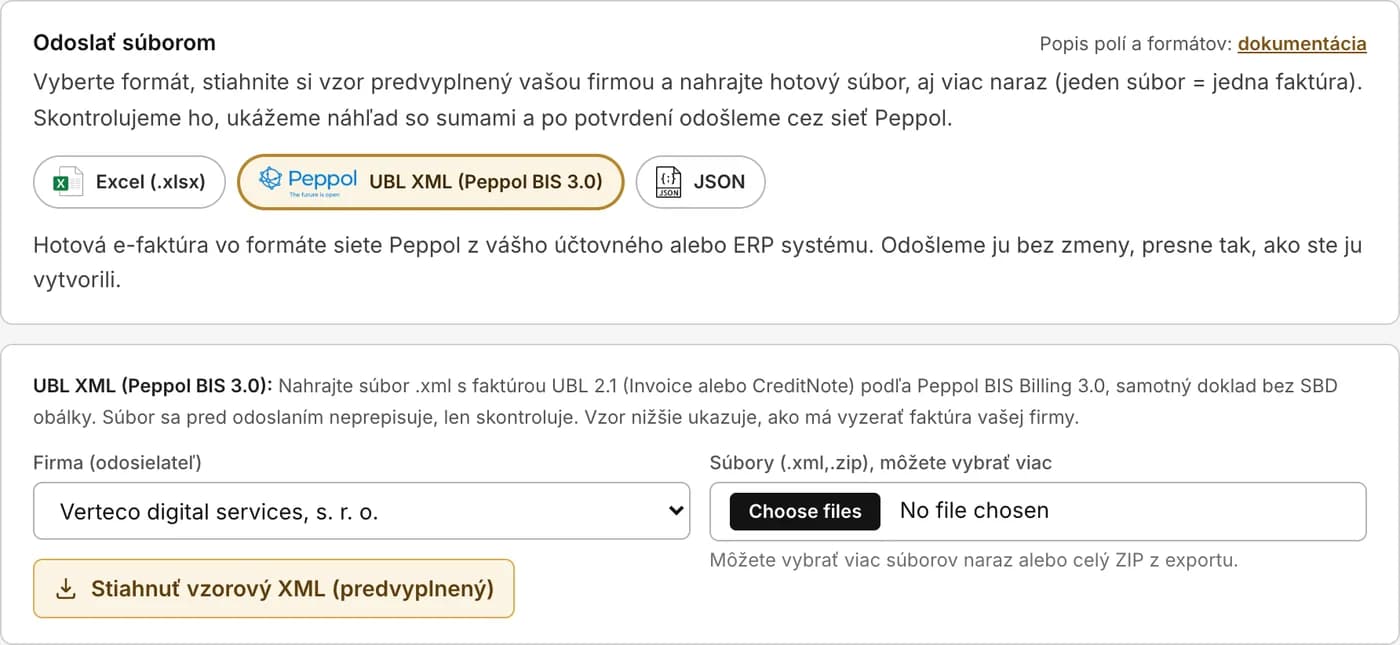
Send by file → UBL XML (Peppol BIS 3.0): choosing the company and uploading the files from the export. Check the preview and send
The portal checks every file against the EN 16931 and Peppol BIS Billing 3.0 rules and shows the invoice number, the customer, the number of lines and the amount incl. VAT. An invoice with an error is skipped and the reason is shown in plain language; you fix it in Fakturatik, export it again and upload it. The Send via Peppol button sends all prepared invoices, one after another. The XML itself is not changed.
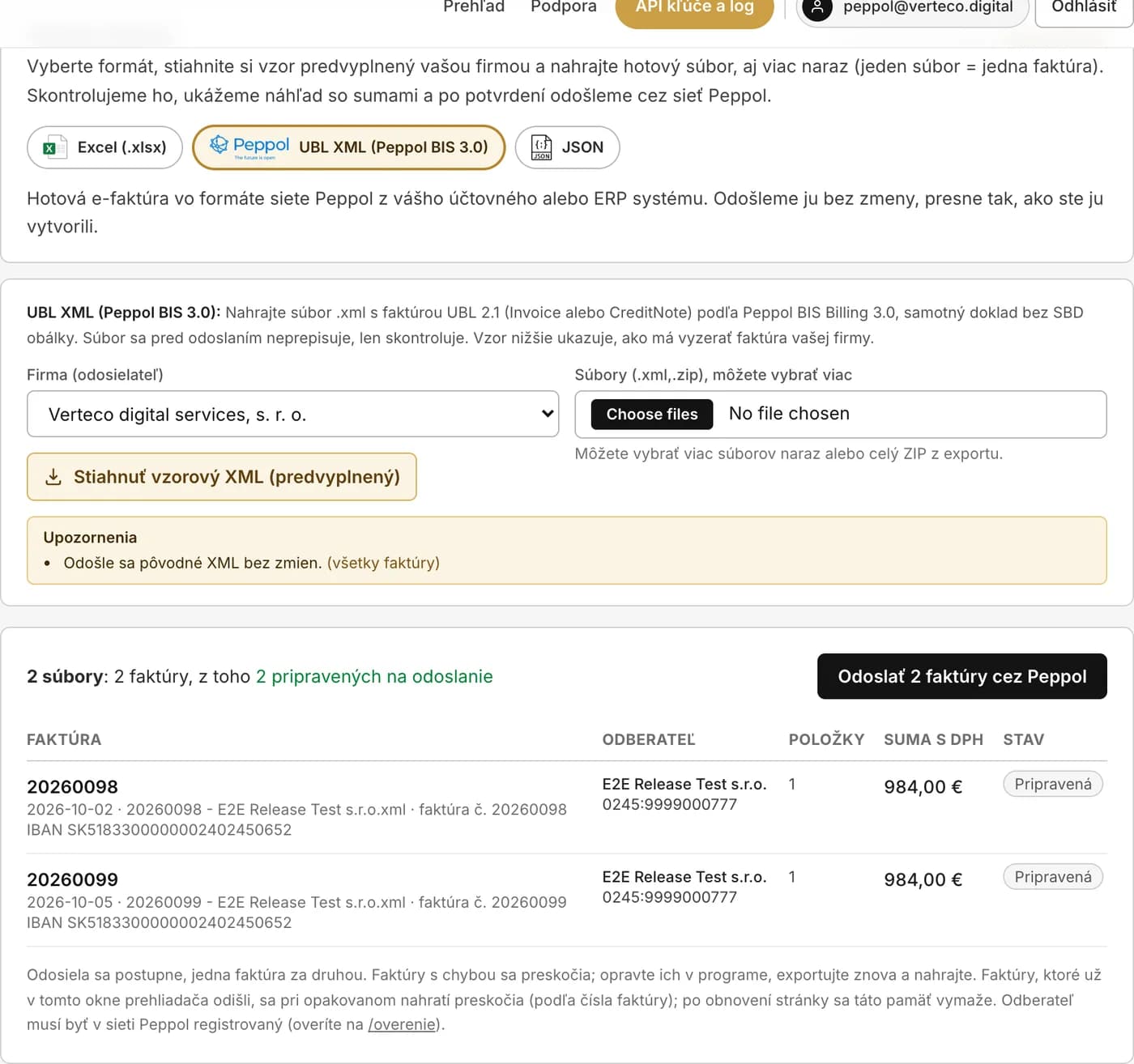
Preview before sending: two files, two ready invoices, one button. Follow the delivery and the report to the Financial Administration
Under Sent invoices you see, for every invoice, the status in the network (handed over, delivered with an MLS receipt, rejected with a reason, or undelivered when the customer is not in the network) and the status of the report to the Financial Administration. E-mails about delivery or rejection are switched on in the Account settings on the Notifications tab. Received e-invoices arrive by e-mail with the PDF and the original XML and are in the portal; Fakturatik does not load them, so you record them as before.
Sent invoices (after signing in) →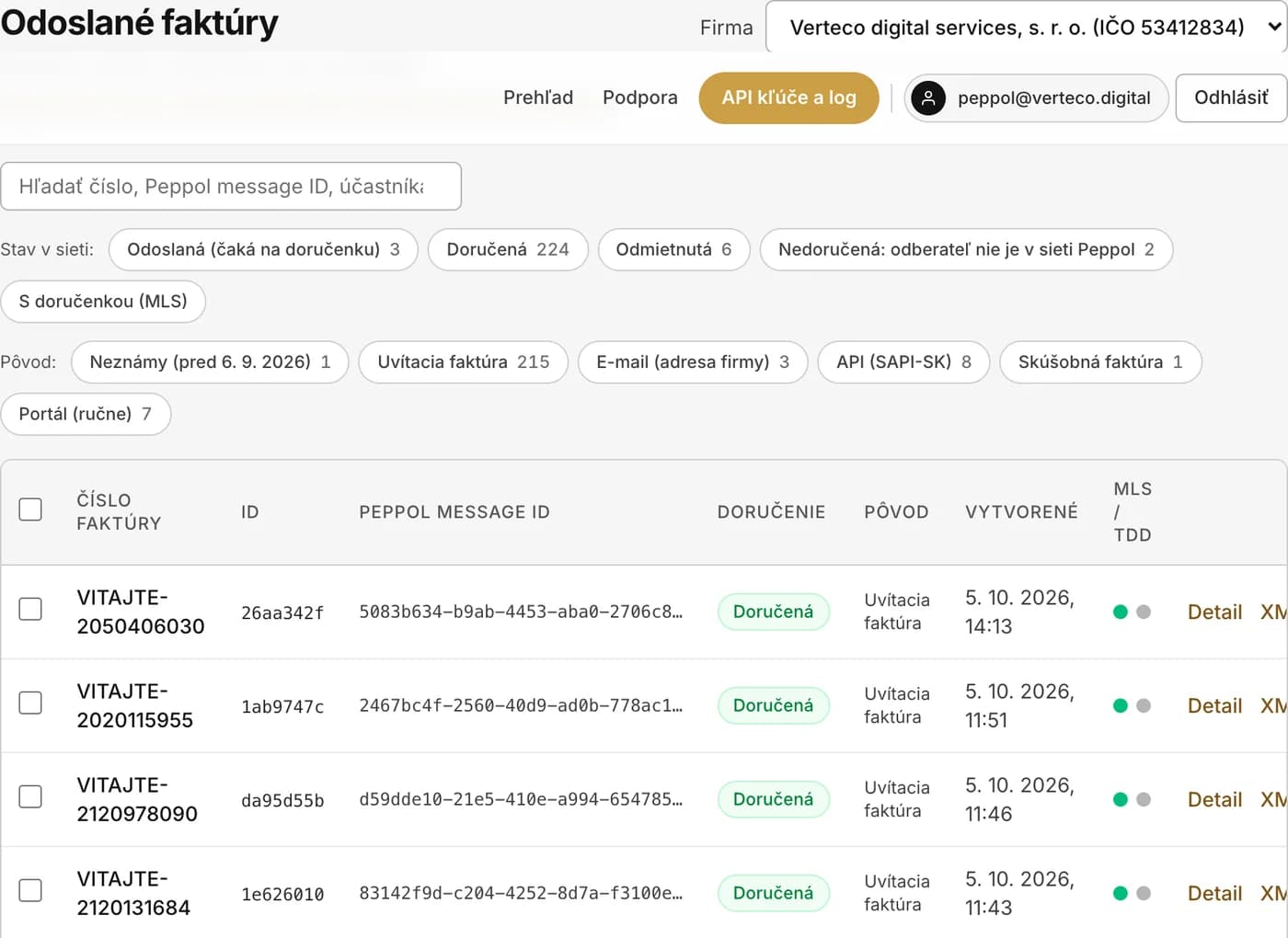
Sent invoices: network status, delivery receipt (MLS) and the report to the Financial Administration (TDD) for every invoice.
Sample e-invoices in the UBL format →Check an exported XML file without signing in →Check whether a customer is in the Peppol network →
Frequently asked questions: e-invoices for Fakturatik
- Does Fakturatik send the e-invoice itself?
- No. Fakturatik issues the e-invoice and stores it as an XML file; sending through the Peppol network, the delivery receipt and the report to the Financial Administration are handled by the Verteco portal, to which you upload the file. The author of the program does not plan direct sending or receiving from Fakturatik for now.
- How do I export several invoices at once?
- The Export XML button on the top bar of Fakturatik exports all invoices issued on the same day as the selected invoice. In the portal, under Send by file, you then select all files at once or upload a whole ZIP; the portal sends them one after another.
- What if the portal rejects the file?
- The portal shows the rule the invoice breaks in plain language (for example a missing VAT ID of the customer or totals that do not add up). You correct the invoice in Fakturatik, export it again and upload it. You can also check the file without signing in, in the validator.
- How do I get received e-invoices into Fakturatik?
- Fakturatik does not load received e-invoices. We send you every received e-invoice by e-mail as a PDF with the original XML and you find it in the portal, which also offers exports to accounting programs and CSV.
- How much does it cost?
- The connection is free. The service costs from €2/month excl. VAT per company ID (IČO) that sends or has the Data archive switched on; receiving with the archive off is free (up to 1,000 invoices a month). During the voluntary period before the mandate of 1 January 2027 everything is free of charge.
Start today: selecting us on the Financial Administration portal is enough
 Choose Verteco on the Financial Administration portal →On the portal, click “Pokračovať” (Continue), sign in (slovensko.sk / eID or your FS portal credentials) and confirm the selection. We handle the rest automaticallyCertified provider of the Financial Administration (EFSK000031) · no commitment · you can change providers at any time
How does the selection work? (3 steps, ~2 minutes)
- 1Click the button above. The official Financial Administration page “Certified provider selection” opens with Verteco pre-selected. Click “Pokračovať” (Continue).
- 2Sign in to the Financial Administration portal, via slovensko.sk (eID / ID card with a chip) or with your PFS credentials, and confirm the provider selection.
- 3Done. A sign-in e-mail arrives. We create your account, company and Peppol network registration automatically. If another provider already holds your receiving record, we do not take it over: you get the migration-code procedure, or you choose in the portal that receiving stays with them and you only send through us.
- No eID? You can also sign in to the Financial Administration portal with your PFS identifier and password. Or register here with an e-mail and password, add your company manually and finish the selection later.
- Your company is not offered in the “taxpayer selection” step? Only entities you are authorised for on the FS portal appear. Add the authorisation in your Personal Internet Zone (Autorizácie → Pridať autorizovaného používateľa), then finish the selection.
- Detailed guide to the FS portal selection (in Slovak) →
Related: Peppol company check · e-invoicing guide 2027 · price list · all integrations